WordPress 7.0 was launched under the codename “Armstrong.” Based on the original news article, what’s interesting isn’t just the new version number, but the direction WordPress is taking, as it begins integrating AI into the core user experience, along with adjustments to the admin panel, design tools, and developer tools to align them more closely.
What is WordPress 7.0 Armstrong?
WordPress named this release after Louis Armstrong, the jazz artist known for his distinctive style. The announcement follows the same concept as WordPress 7.0: giving web developers more tools while still allowing them to create websites with their own personality, rather than generic, identical-looking templates.
From a business owner's perspective, this version clearly signals that WordPress is continuing to evolve in terms of AI, content creation, backend user experience, and system expansion. For those considering... We develop WordPress websites. Therefore, version 7.0 should be viewed as an overview of the platform's direction, not just a list of minor features.
Quick summary of key features.
| group | What changed | Who benefits? |
|---|---|---|
| AI | AI Client in Core, Connector hub, Abilities API, and AI plugin. | Content teams, developers, and web teams who need a new workflow. |
| Dashboard | New look: Command Palette, Font management, Revision view. | Website administrators and daily content editing team. |
| Design | New Blocks Responsive controls, Menu overlay, Pattern control, Block CSS | Web designers and teams who need to control the layout per viewport. |
| Developer | Create blocks and patterns with PHP, Site Editor extensibility. | Plugin, theme, and custom website team. |
Where does AI fit into WordPress 7.0?
The launch announcement indicates that WordPress 7.0 lays the foundation for AI throughout the user experience, with an AI Client in the core for communicating with generative AI models and a centralized management of connections in the dashboard. When paired with the Abilities API, this opens up more automation and new content creation tools.
For general users, this will be easier to understand from the AI plugins that WordPress provides as examples, such as creating or editing images, helping to think of titles or excerpts, and suggesting alt text for images. This is very interesting, but it's not yet a reason to let AI decide everything. Titles, descriptions, and alt text for images still need to meet the brand's needs and the actual context of the webpage.
Client-Side Abilities to Watch Out For
WordPress 7.0 also adds a JavaScript Client-Side Abilities package with a UI and command palette for hybrid capabilities between web tools and AI. This is a feature to watch for teams that want to create specific workflows, such as issuing commands from the admin panel without having to open multiple menus.
A new dashboard and more user-friendly tools.
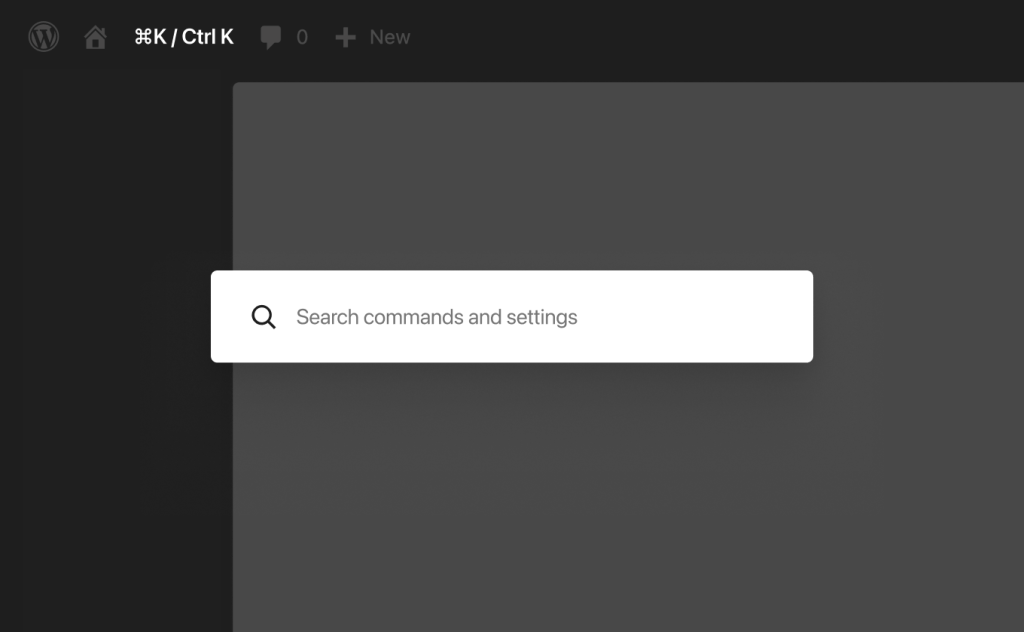
Another noticeable change is the redesigned admin panel, which looks more modern, features a new color theme, and smoother transitions between screens. A small but frequently used detail is the Command Palette shortcut on the top bar, which WordPress states can be accessed with the `⌘K` icon or `Ctrl+K`.
Back-end tasks that should be faster.
- Manage fonts from a single font management page. Supports block, hybrid, and classic themes.
- View the revision differences more quickly before restoring to your desired version.
- Finding commands and settings from the Command Palette is now more convenient.
Blocks and more flexible design.
WordPress 7.0 doesn't just focus on AI; the design side also receives practical additions, such as a Gallery block for lightbox slideshows, more detailed Heading blocks, Breadcrumbs blocks for navigation, and Icons blocks for adding image details to layouts.
Responsive control that web developers will probably like.
The original news article mentioned hiding or showing blocks based on device, styling based on breakpoints, and customizing breakpoints. This helps reduce the feeling that desktop and mobile interfaces require completely different solutions, especially for websites with complex heroes, menus, cards, or sections.
Menu overlay, Patterns, and Block CSS
Overlay menus can be designed with more blocks and patterns. Patterns work as a single unit but can be adjusted specifically in certain areas. There's also custom block-level CSS for posts or pages, allowing users to maintain brand consistency without making overly broad changes.
Things developers should keep an eye on.
For WordPress 7.0 developers, additional tools are added to streamline the creation of custom pathways, such as building server-side blocks and patterns with PHP and enabling Block API auto-registration. The Site Editor is also more extensible with routing, route validation, and a new `wordpress/boot` package for plugins that require creating pages within the Site Editor.
A practical perspective.
For a typical business website, these features might not be necessary to implement every time from day one. However, if the website has custom workflows, dedicated plugins, multilingual content, or a team of multiple people collaborating on website development, these are signs that WordPress continues to invest in both the editor experience and extensibility.
SEO, AEO, and GEO perspectives to consider in WordPress 7.0.
SEO: Improved page structure and content editing experience.
Blocks that assist with navigation, headings, responsive layout, and alt text workflow allow website maintenance teams to work more efficiently, but SEO results still depend on the actual content, website speed, internal links, and relevance to the intent of the search terms.
AEO: The answer must be easy to read and applicable.
For answer engines to understand a webpage, key questions should be answered with clear headings, concise summaries, and straightforward FAQs. AI-powered writing features are useful, but writers still need to ensure the meaning stays true to the actual service.
GEO: AI Search requires reliable context.
A webpage that clearly details services, procedures, pricing, terms and conditions, and expert information is generally more suitable than a website with only short promotional messages. If you want to structure your article for easy searching and summarization, consider reading these ideas. SEO vs AEO vs GEO When viewed together, the picture becomes clearer.
What should you check before updating to WordPress 7.0?
New features look appealing, but a real website involves themes, plugins, cache, custom code, and multiple layers of interconnected systems. Therefore, it's better to thoroughly check everything before updating than simply checking if a new release has been announced.
- Data backup and rollback are possible.
- Check the plugins and themes your website is using, especially those related to editors, SEO, forms, and e-commerce.
- Test the content editing page, mobile page, and key workflows after the update.
- If you have custom blocks or specific plugins, you should test them on staging before using them in a live launch.
Should the website owner update immediately?
Short answer: Updates will be available when the system is ready, not when you see the news and immediately click to update.
If a website has a dedicated technical team for support and testing, updates help introduce new features and keep up with the platform. However, if the website has outdated plugins, custom code changes, or is selling products daily, planning for updates beforehand is often more cost-effective than fixing problems after the website experiences issues.
I want to update WordPress to ensure everything is working correctly before going live.
Creative helps manage WordPress websites from theme and plugin testing, staging, backups, testing key user interfaces, to optimizing content for SEO, AEO, and GEO, ensuring the website is ready for continued use, not just a matter of updating and being done.
View services Maintaining a WordPress website. To plan website updates and maintenance that are tailored to the actual needs of your business.
Original source: WordPress 7.0 “Armstrong” on WordPress.org